 |
Group Activity 6 |
|
|
|
Group Activity 6 |
|
All group activities must include a statement signed by all members of your group that each group member fully participated in the activity. Save it to the desktop and save frequently during the hour.
Learning Goals for this Activity
1. Open School enrollment 204.xls. We want to look at trends in Private School Enrollment - Grades 9-12. Using the techniques we learned in class or by referring to Techniques in Excel, eliminate all the "extra data". The data remaining should include the following columns:
Year
Private School Enrollment - Grades 9 -12
Remember to also omit any projected data points (2002 seems to be ok to use - be sure to edit the cell and remove the "/2"). Change years from text to numbers where applicable. (Please note that row number 55 is empty, as well as a few others, and the row height is adjusted so it can't be seen. Make sure your data ends with year 2002.)
2. Make a descriptive graph of the data and include the trendline, R-squared value and equation. Paste the graph in your Word document.
3. Is this equation a good fit for the data? Explain. Delete the trendline, equation and R-squared value from your graph.
4. Add a localized trend to you graph. Highlight years 1993 through 2002 and the corresponding enrollment data. "Drag" this data onto the graph. To drag the data, the cursor needs to be an arrow. To get an arrow, touch the edge of the selected data and the cursor will change from a cross to an arrow. Choose the following:
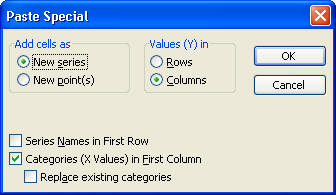
Now add a trendline to your new data (years 1993-2002 only). Include the R-squared value and equation. Is the "new" equation a good fit for the data? Explain.
5. Calculate the projected private school enrollment for 2008 and type it in your Word document.
6. Below the last entry of 2002 in Excel, type 2008. In the cell next to 2008, type in your prediction for 2008. Highlight 2008 and your prediction. "Drag" these two numbers onto the graph. Choose the following:
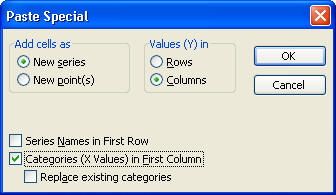
Paste this graph in your Word document.
7. Write a paragraph stating your prediction along with statements supporting your model. The first sentence should clearly state your prediction and the years it was based on. The supporting statements should be informative and provide convincing evidence justifying your prediction. Remember to discuss the R-squared value and practical knowledge about the topic. Also discuss the number of data points used, outliers and shape of the graph (localized trends) when applicable. See Justifying your prediction in Words.
Turn in questions 1 - 7. The remainder of this activity will be completed in PowerPoint.
8. Open up PowerPoint and create a new slideshow. Choose a blank side (you can use <Format><Slide Layouts> to choose the slide layout). Paste the graph from question 6 in the blank slide.
9. Create a duplicate of this slide by choosing <Insert><Duplicate Slide>. Using the tools on the drawing toolbar choose the arrow button. Draw an arrow on your graph pointing to the prediction. (This should be done on slide 2.)
10. Insert a third slide in PowerPoint. This slide (slide 3) should contain the names of the members in your group.
11. Animate the graph on slide one (the graph without the "arrow").
a) Right click on the graph and choose custom animation. Select Add Effect followed by Entrance which can be found on the right side of the screen. Choose either Blinds, Box, Checkerboard or Diamond. Boomerang, Ease In, and Fly in do not work.
b) Click on the drop down box on the right side of your screen which should be titled "object" followed by a number (for example, object 1). Choose Effect Options.
c) Next choose the Chart Animation tab. You will get a dialogue box that looks like:
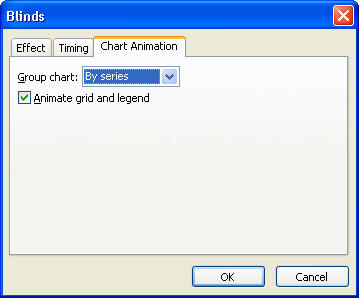
Usually animating by series is what you want.
12. Try viewing your slide show. The original data will appear first, then the data with the trendline, followed by your prediction and the last thing to appear will be the "arrow" pointing to your prediction.
13. Add some color to your slides. Use Format, Background to get the following box:
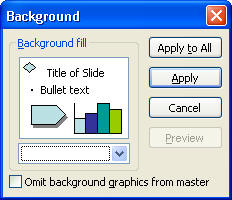
Use the dropdown box to choose a color(s) and fill effects. Apply your choice to all three slides.
14. Show me your mini-PowerPoint presentation to receive credit for questions 8-13.